为什么 pip 安装某些包需要 GCC 环境,而 conda 不需要
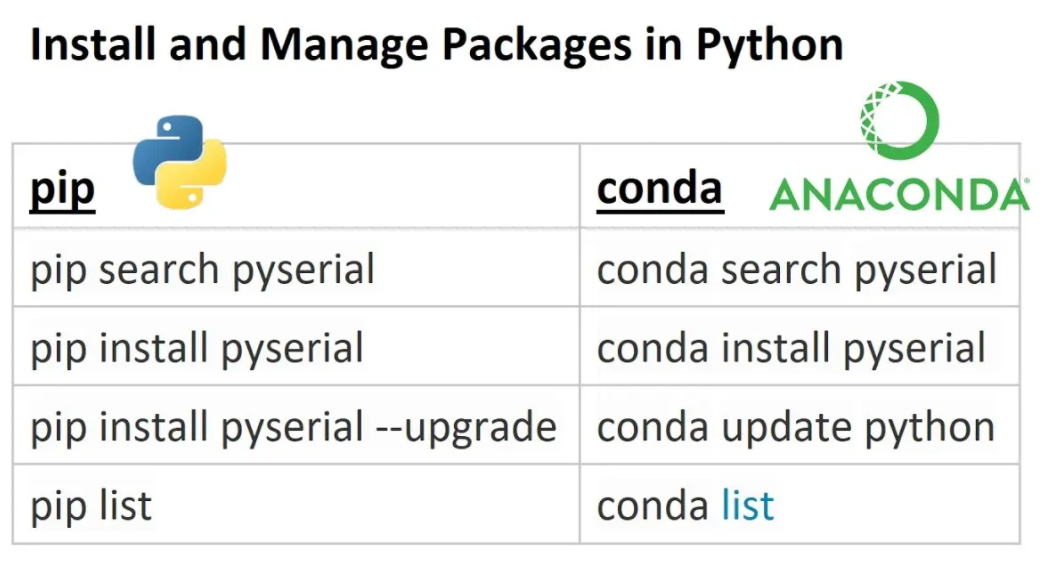
核心差异:预编译 vs 源码编译
Pip 安装流程:
用户请求安装 → PyPI 查找包 → 源码包/预编译包 → [需要时编译] → 安装Conda 安装流程:
用户请求安装 → conda-forge 查找 → 预编译二进制包 → 直接安装什么是 Python 预编译包?
Python 预编译包是指在发布时已经编译好的包,用户下载后可以直接使用,无需在本地编译。
源码包(Source Distribution - .tar.gz)
1# 源码包结构
2numpy-1.24.3.tar.gz
3├── numpy/
4│   ├── core/
5│   │   ├── _multiarray_umath.c      # C 源文件
6│   │   └── _multiarray_umath.pyx    # Cython 源文件
7│   ├── __init__.py
8│   └── setup.py                     # 构建脚本
9└── PKG-INFO
预编译包(Wheel - .whl)
1# Wheel 包结构(已编译)
2numpy-1.24.3-cp311-cp311-win_amd64.whl
3├── numpy/
4│   ├── core/
5│   │   ├── _multiarray_umath.cp311-win_amd64.pyd  # 已编译的 C 扩展
6│   │   └── __init__.py
7│   └── __init__.py
8├── numpy-1.24.3.data/
9└── numpy-1.24.3.dist-info/
Wheel 格式命名规则
1package-name-version-python-tag-abi-tag-platform-tag.whl
2# 例如:
3numpy-1.24.3-cp311-cp311-win_amd64.whl
4#     ↑      ↑    ↑     ↑
5#     |      |    |     └─ 平台:Windows 64位
6#     |      |    └─ ABI:Python 3.11 ABI
7#     |      └─ Python:CPython 3.11
8#     └─ 版本:1.24.3
预编译包 vs 源码包对比
| 特性 | 源码包 (.tar.gz) | 预编译包 (.whl) |
|---|---|---|
| 安装速度 | 慢(需要编译) | 快(直接复制) |
| 依赖要求 | 需要编译器 | 仅运行时依赖 |
| 兼容性 | 需要本地适配 | 预验证兼容性 |
| 包大小 | 小 | 大(包含二进制) |
| 性能 | 可优化编译 | 标准优化 |
| 平台支持 | 跨平台编译 | 平台特定 |
技术原理解析
1. Pip 的两种包格式
A. 源码包(Source Distribution - .tar.gz)
1# 当 pip 找不到预编译包时,会下载源码包
2pip install numpy
3# ↓
4# 下载 numpy-1.24.3.tar.gz(包含 .c/.cpp 源文件)
5# ↓
6# 需要 GCC 编译器编译 C 扩展
7# ↓
8# 生成 .pyd/.so 文件
9# ↓
10# 安装到 Python 环境
B. 预编译包(Wheel - .whl)
1# 优先下载预编译的 wheel 包
2pip install numpy
3# ↓
4# 下载 numpy-1.24.3-cp311-cp311-win_amd64.whl(已编译)
5# ↓
6# 直接解压安装(无需编译)
2. Conda 的预编译策略
1# conda 始终使用预编译包
2conda install numpy
3# ↓
4# 下载预编译的 numpy 包
5# ↓
6# 直接解压安装(Windows: .dll, Linux: .so)
具体对比分析
| 特性 | Pip | Conda |
|---|---|---|
| 包格式 | 源码包 + 预编译包 | 仅预编译包 |
| 编译时机 | 安装时编译 | 构建时预编译 |
| 依赖管理 | Python 级别 | 系统级别 |
| 跨平台 | 需要编译器 | 预编译适配 |
| 安装速度 | 可能很慢(编译) | 通常很快 |
| 兼容性 | 依赖编译环境 | 稳定可靠 |
为什么需要 GCC?
Python 包中的 C 扩展:
1// numpy 为例:_multiarray_umath.c
2static PyMethodDef multiarray_methods[] = {
3    {"dot", (PyCFunction)array_matrixproduct, METH_VARARGS, NULL},
4    // C 语言实现的高性能函数
5};编译过程:
# Windows (MinGW-w64)
gcc -shared -fPIC -O2 -o numpy/core/_multiarray_umath.cp311-win_amd64.pyd
    numpy/core/src/multiarray/_multiarray_umath.c

# Linux
gcc -shared -fPIC -O2 -o numpy/core/_multiarray_umath.cpython-311-x86_64-linux-gnu.so
    numpy/core/src/multiarray/_multiarray_umath.c
详细技术流程对比
Pip 安装 numpy 的完整流程:
1# pip install numpy 的内部流程
2def pip_install_numpy():
3    # 1. 检查 PyPI 上的可用包
4    available_packages = [
5        "numpy-1.24.3.tar.gz",           # 源码包
6        "numpy-1.24.3-cp311-win_amd64.whl" # 预编译包
7    ]
8
9    # 2. 优先选择预编译包(如果存在且匹配)
10    if has_matching_wheel(available_packages):
11        download_and_install_wheel()  # 无需编译
12    else:
13        # 3. 没有匹配的预编译包,下载源码包
14        download_source_package()
15
16        # 4. 需要编译 C 扩展
17        if needs_compilation():
18            check_compiler_availability()  # 检查 GCC
19            compile_c_extensions()         # 编译
20        install_package()
Conda 安装 numpy 的流程:
1# conda install numpy 的内部流程
2def conda_install_numpy():
3    # 1. 在 conda-forge 中查找
4    # 2. 获取预编译包信息
5    package_info = {
6        "name": "numpy",
7        "version": "1.24.3",
8        "build_string": "py311h2eaa208_0",  # 预编译标识
9        "binary_path": "lib/python3.11/site-packages/numpy"
10    }
11
12    # 3. 直接下载预编译的二进制文件
13    download_binary_package()  # 已编译,无需 GCC
14
15    # 4. 解压安装
16    install_binary_files()
什么时候 Pip 会需要 GCC?
1. 缺少预编译 wheel 包
# 特定 Python 版本没有预编译包
pip install some-package  # 只有 .tar.gz,没有 .whl
# → 需要编译
2. 特定平台没有预编译包
# 某些 Linux 发行版或架构
pip install numpy  # 没有 aarch64 预编译包
# → 需要编译
3. 从源码安装
pip install --no-binary :all: package-name  # 强制源码安装
# → 必须编译
解决方案对比
Pip 的解决方案:
# 方案1:使用预编译包(推荐)
pip install --only-binary=all package-name

# 方案2:安装编译器
# Windows: 安装 Visual Studio Build Tools 或 MinGW
# Linux: apt-get install build-essential
# macOS: xcode-select --install
Conda 的优势:
# 始终使用预编译包,无需额外配置
conda install package-name  # 总是预编译的
实际应用建议
何时选择 Pip:
- 需要最新版本(PyPI 更新快)
- 纯 Python 包(无 C 扩展)
- 特定平台优化
何时选择 Conda:
- 避免编译问题
- 科学计算包(numpy, scipy, pandas)
- 跨平台兼容性
总结
"Pip = 灵活性 + 编译依赖" "Conda = 稳定性 + 预编译包"
- Pip:下载源码 → 需要编译器 → 生成二进制
- Conda:下载二进制 → 直接安装 → 无需编译器
这就是为什么 conda 安装科学计算包更稳定,而 pip 在某些情况下需要 GCC 环境的根本原因!