记录服务器上cuda和对应的paddlepaddle-gpu安装
记录服务器上cuda和对应的paddlepaddle-gpu安装
文章目录
- 记录服务器上cuda和对应的paddlepaddle-gpu安装
- 解决的问题:
- 问题1:C++ Traceback错误
- 问题2:CUBLAS_STATUS_NOT_INITIALIZED错误
- 原因剖析:
- 安装流程:
解决的问题:
问题1:C++ Traceback错误

问题2:CUBLAS_STATUS_NOT_INITIALIZED错误
Traceback (most recent call last):
  File "/disks/sdb/user_space/niemengying/pipeline2/2-pre_annotation.py", line 13, in <module>
    output = pipeline.predict(
        input=f"tangut_dense2/{each_page_image_file}"
    )
  File "/disks/sdb/user_space/niemengying/miniconda3/lib/python3.13/site-packages/paddleocr/_pipelines/pp_structurev3.py", line 211, in predict
    return list(
        self.predict_iter(
    ...<32 lines>...
        )
    )
  File "/disks/sdb/user_space/niemengying/miniconda3/lib/python3.13/site-packages/paddlex/inference/pipelines/_parallel.py", line 129, in predict
    yield from self._pipeline.predict(
    ...<3 lines>...
    )
  File "/disks/sdb/user_space/niemengying/miniconda3/lib/python3.13/site-packages/paddlex/inference/pipelines/layout_parsing/pipeline_v2.py", line 1137, in predict
    table_res_all = list(
        self.table_recognition_pipeline(
    ...<14 lines>...
        ),
    )
  File "/disks/sdb/user_space/niemengying/miniconda3/lib/python3.13/site-packages/paddlex/inference/pipelines/_parallel.py", line 129, in predict
    yield from self._pipeline.predict(
    ...<3 lines>...
    )
  File "/disks/sdb/user_space/niemengying/miniconda3/lib/python3.13/site-packages/paddlex/inference/pipelines/table_recognition/pipeline_v2.py", line 1343, in predict
    self.predict_single_table_recognition_res(
    ~~~~~~~~~~~~~~~~~~~~~~~~~~~~~~~~~~~~~~~~~^
        crop_img_info["img"],
        ^^^^^^^^^^^^^^^^^^^^^
    ...<6 lines>...
        use_ocr_results_with_table_cells,
        ^^^^^^^^^^^^^^^^^^^^^^^^^^^^^^^^^
    )
    ^
  File "/disks/sdb/user_space/niemengying/miniconda3/lib/python3.13/site-packages/paddlex/inference/pipelines/table_recognition/pipeline_v2.py", line 989, in predict_single_table_recognition_res
    table_structure_pred = next(self.wired_table_rec_model(image_array))
  File "/disks/sdb/user_space/niemengying/miniconda3/lib/python3.13/site-packages/paddlex/inference/models/base/predictor/base_predictor.py", line 211, in __call__
    yield from self.apply(input, **kwargs)
  File "/disks/sdb/user_space/niemengying/miniconda3/lib/python3.13/site-packages/paddlex/inference/models/base/predictor/base_predictor.py", line 267, in apply
    prediction = self.process(batch_data, **kwargs)
  File "/disks/sdb/user_space/niemengying/miniconda3/lib/python3.13/site-packages/paddlex/inference/models/table_structure_recognition/predictor.py", line 92, in process
    batch_preds = self.infer(x=x)
  File "/disks/sdb/user_space/niemengying/miniconda3/lib/python3.13/site-packages/paddlex/inference/models/common/static_infer.py", line 287, in __call__
    pred = self.infer(x)
  File "/disks/sdb/user_space/niemengying/miniconda3/lib/python3.13/site-packages/paddlex/inference/models/common/static_infer.py", line 252, in __call__
    self.predictor.run()
    ~~~~~~~~~~~~~~~~~~^^
OSError: In user code:


    ExternalError: CUBLAS error(1).
      [Hint: 'CUBLAS_STATUS_NOT_INITIALIZED'.  The cuBLAS library was not initialized. This is usually caused by the lack of a prior cublasCreate() call, an error in the CUDA Runtime API called by the cuBLAS routine, or an error in the hardware setup.  To correct: call cublasCreate() prior to the function call; and check that the hardware, an appropriate version of the driver, and the cuBLAS library are correctly installed.  ] (at /paddle/paddle/phi/kernels/funcs/blas/blas_impl.cu.h:42)
      [operator < pd_op.while > error]
原因剖析:
- cuda安装问题:
nvcc -V返回
XXX@inspur:~/cuda12$ nvcc -V
Command 'nvcc' not found, but can be installed with:
apt install nvidia-cuda-toolkit
Please ask your administrator.
- cuda和paddle-gpu版本冲突
cuda 12.4, paddlepaddle-gpu 3.1.0
安装流程:
- 查看可以安装的最高版本,
nvidia-smi。版本cuda-12.4
+-----------------------------------------------------------------------------------------+
| NVIDIA-SMI 550.90.07              Driver Version: 550.90.07      CUDA Version: 12.4     |
|-----------------------------------------+------------------------+----------------------+
- 查看linux服务器版本,
cat /proc/version(注意:有空格,直接复制粘贴)。版本-Ubuntu 22.04
Linux version 5.15.0-151-generic (buildd@lcy02-amd64-092) (gcc (Ubuntu 11.4.0-1ubuntu1~22.04) 11.4.0, GNU ld (GNU Binutils for Ubuntu) 2.38) #161-Ubuntu SMP Tue Jul 22 14:25:40 UTC 2025
- 下载cuda
CUDA Toolkit下载界面
因为最高cuda版本为12.4,又cuda的稳定版本有11.8,12.6,12.9,因此,安装11.8版本。

在Downloads界面,选择如下配置: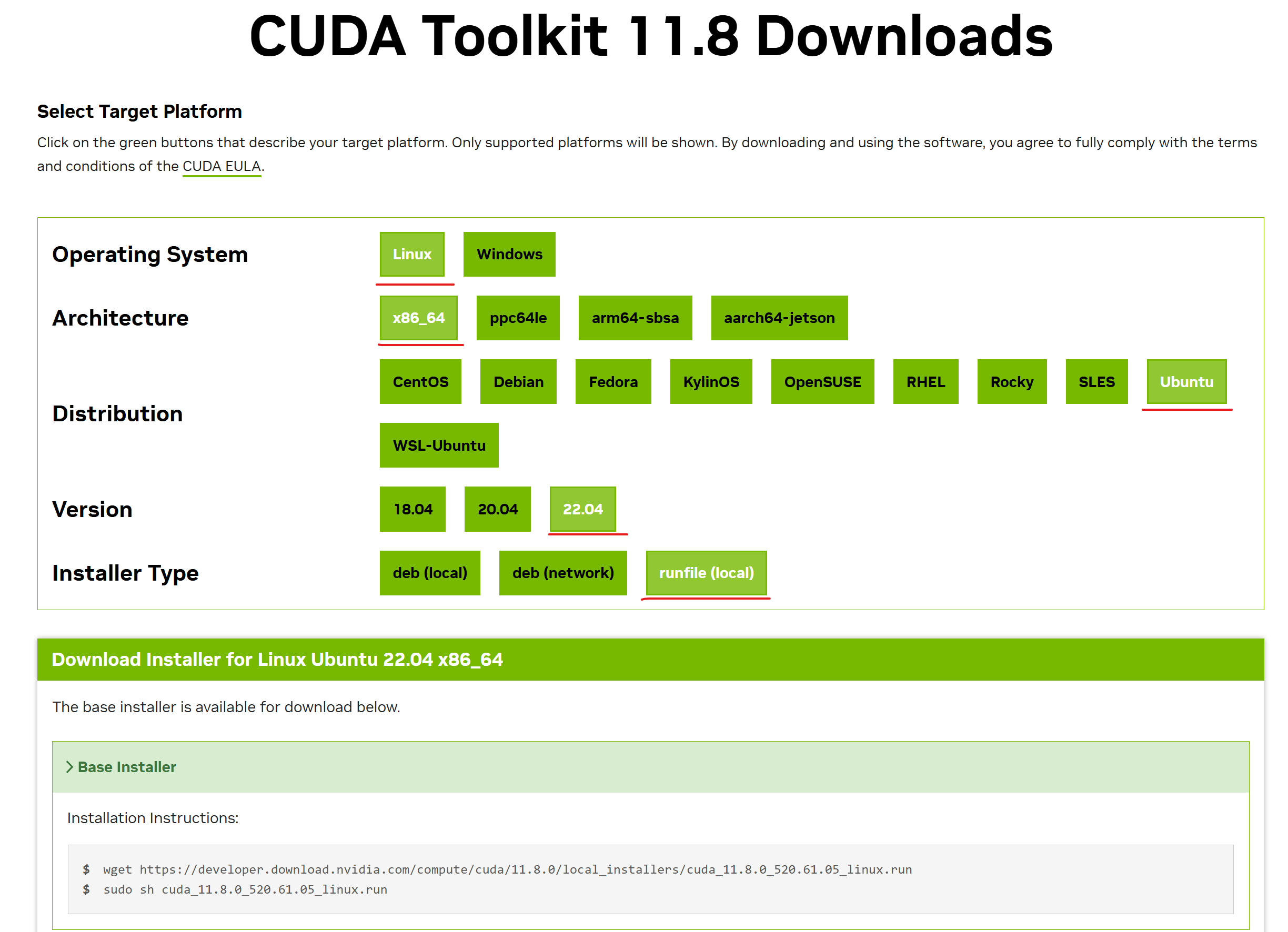 在服务器上输入下载命令:
wget https://developer.download.nvidia.com/compute/cuda/11.8.0/local_installers/cuda_11.8.0_520.61.05_linux.run

下载完成后。服务器上显示如下文件:

4. 服务器安装cuda
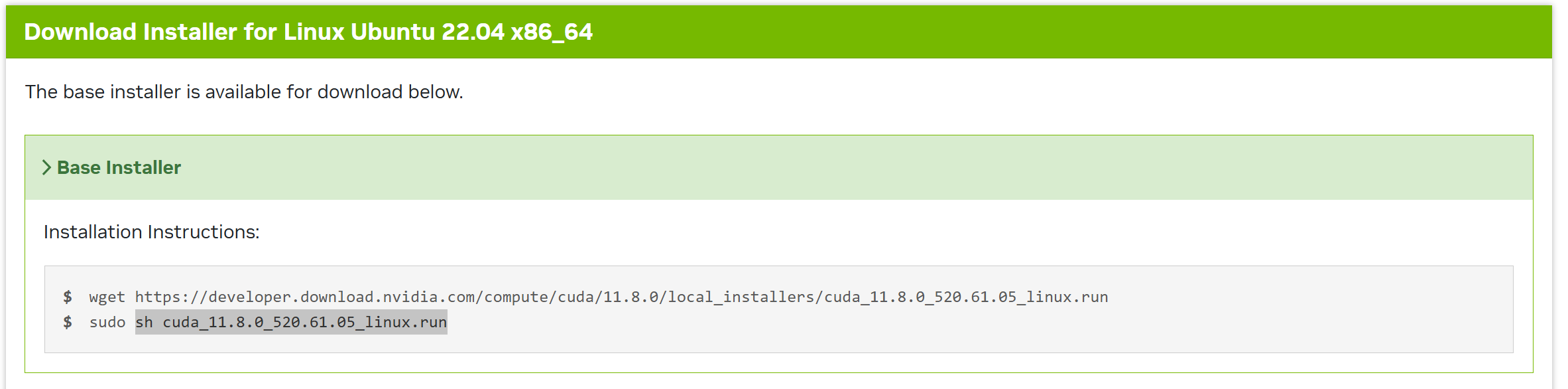
注意:因为没有sudo权限,直接运行sh cuda_11.8.0_520.61.05_linux.run
(此步骤可能需要耗费一些时间,请耐心等待)
使用回车键进行选择

输入accept,再回车:
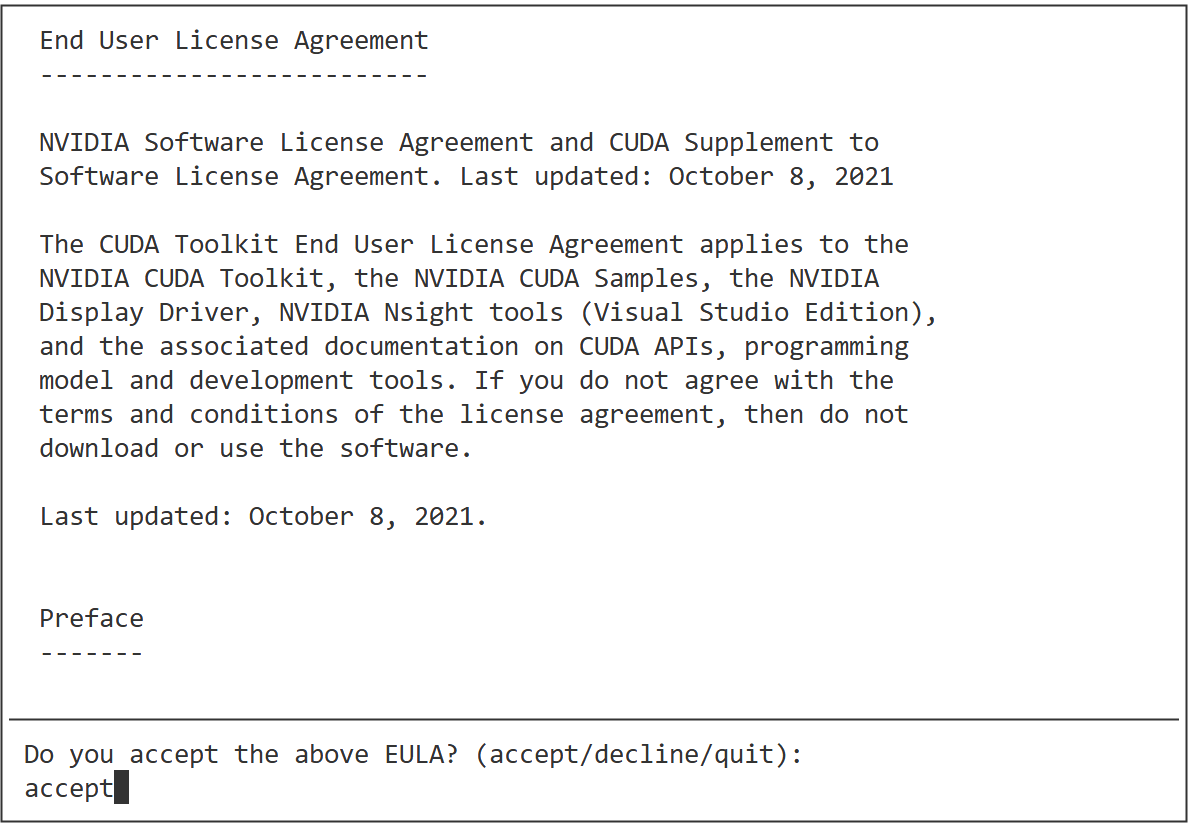
利用上下键与Enter勾选对话框,选定内容如下:
随后选择Options,与Enter

选择Toolkit Options:

利用上下键与Enter勾选对话框,选定内容如下:
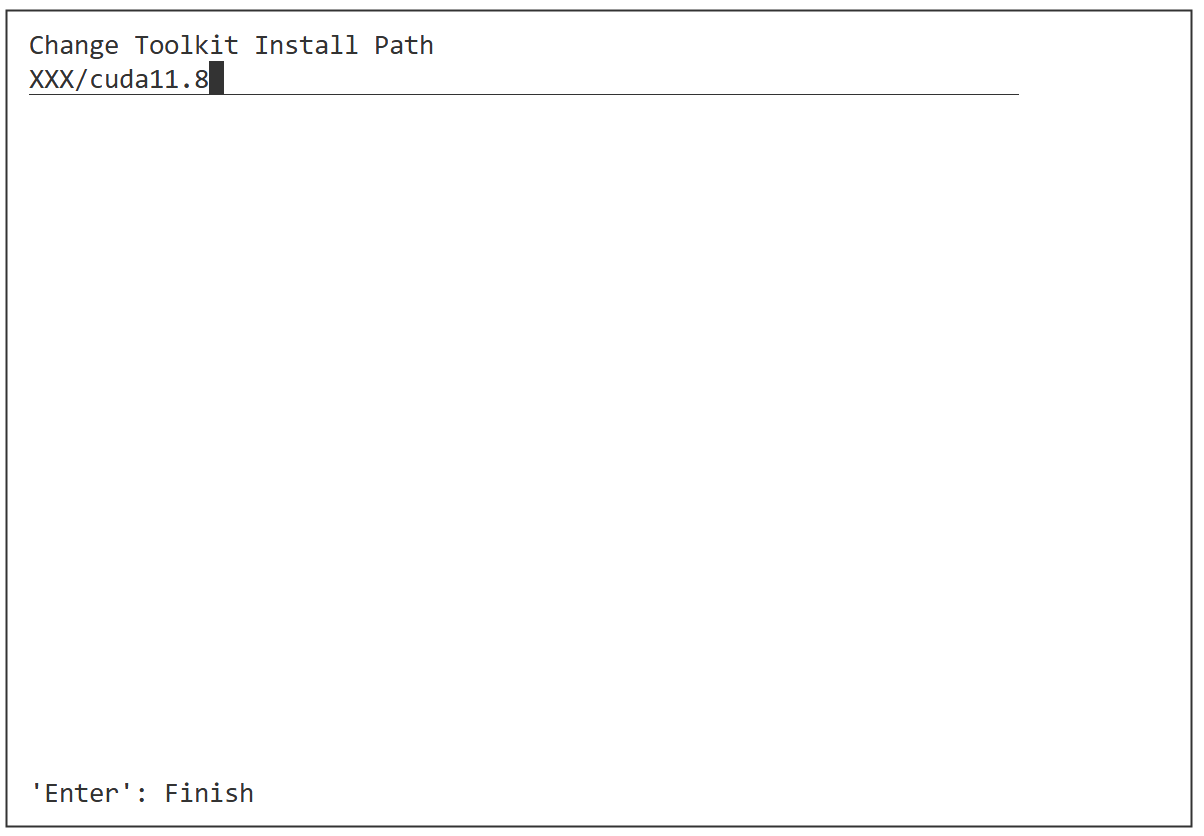
随后选择Change Toolkit Install Path,与Enter

填写cuda安装路径,与Enter
进入自己建立的文件夹中(使用cd XXX/cuda11.8),使用pwd获取绝对路径。
选择Done,一路返回:
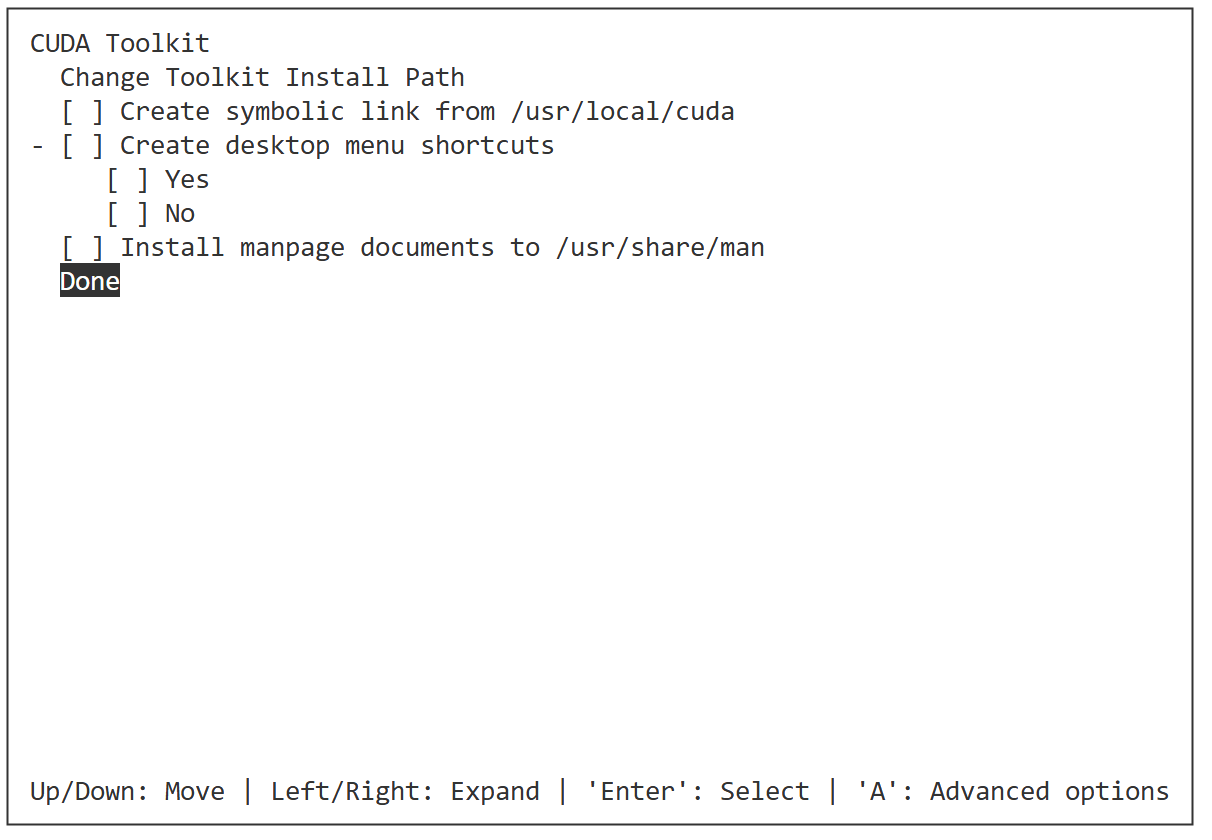

选择Install,进行下载:

出现以下内容,则安装完成

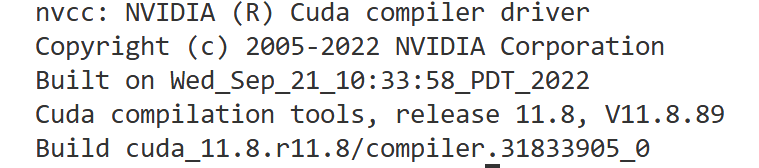
5. 安装测试,命令nvcc -V,返回如下:
6. 安装paddle-gpu
paddle-gpu网址,选择如下:

服务器输入命令:
python -m pip install paddlepaddle-gpu==3.1.1 -i https://www.paddlepaddle.org.cn/packages/stable/cu118/
至此,安装了cuda与对应的paddle-gpu,问题解决。