Python爬虫入门实战指南
1. requests 模块
1.1. 处理 get 请求
import requests

content = input('请输入你要检索的内容:')
url = f"https://www.sogou.com/web?query={content}"
headers = {
    # 添加一个请求头信息 UA
    "User-Agent": "Mozilla/5.0 (Windows NT 10.0; Win64; x64) AppleWebKit/537.36 (KHTML, like Gecko) Chrome/143.0.0.0 Safari/537.36"
}
response = requests.get(url, headers=headers)
print(response.text)
1.2. 处理 post 请求
import requests

url = "https://fanyi.baidu.com/sug"

data = {
    "kw": input("请输入一个单词")
}

resp = requests.post(url, data=data)
resp.encoding = "utf-8"

# 此时拿到的是文本字符串
print(resp.text)
# 此时拿到的是 json 数据
print(resp.json())
1.3. 多参数 get 请求
import requests

url = "https://movie.douban.com/j/chart/top_list"

data = {
    "type": "13",
    "interval_id": "100:90",
    "action": "",
    "start": "0",
    "limit": "20"
}

headers = {
    "User-Agent": "Mozilla/5.0 (Windows NT 10.0; Win64; x64) AppleWebKit/537.36 (KHTML, like Gecko) Chrome/138.0.0.0 Safari/537.36 Edg/138.0.0.0"
}

resp = requests.get(url, params=data, headers=headers)
# print(resp.text)
print(resp.json())
print(resp.request.url)
2. 正则表达式
2.1. 元字符

2.2. 量词
控制前面元字符出现的次数

2.3. 贪婪匹配 | 惰性匹配


3. 数据解析方式
3.1. re 解析
3.1.1. 基本使用
import re

result = re.findall("a", "我是一个abcdefga")
print(result)
# 输出:['a', 'a']


result = re.findall(r"d+", "我今年18岁,我有20000000块")
print(result)
# 输出:['18', '20000000']


result = re.finditer(r"d+", "我今年18岁,我有20000000块")
for item in result:  # 从迭代器中拿到内容
    print(item.group())  # 从匹配到的结果中拿到数据
# 输出:
# 18
# 20000000


# search 只会匹配到第一次匹配的内容
result = re.search(r"d+", "我叫周杰伦,今年32岁,我的班级是3年2班")
print(result.group())
# 输出:32


# match 在匹配的时候,是从字符串的开头进行匹配的,类似在正则前面加上了^
result = re.match(r"d+", "我叫周杰伦,今年32岁,我的班级是3年2班")
print(result)
3.1.2. 预加载
提前加载正则对象
# 预加载
# 提前把正则对象加载完毕
obj = re.compile(r"d+")
# 直接把加载好的正则进行使用
result = obj.findall("我叫周杰伦,今年32岁,我的班级是3年2班")
print(result)
3.1.3. 提取分组数据
# 提取分组数据
# (?P<名字>正则)
# 提取数据的时候,需要group("名字")
s = """
中国联通>
中国移动>
"""
obj01 = re.compile(r".*?")
obj02 = re.compile(r"(.*?)")
obj03 = re.compile(r"(?P.*?) ")
result01 = obj01.findall(s)
result02 = obj02.findall(s)
result03 = obj03.finditer(s)
print(result01)
print(result02)
for item in result03:
id = item.group("id")
name = item.group("name")
print(id)
print(name)
3.1.4. 实操案例
爬取豆瓣 top250 电影信息
import csv
import re
import requests
# 使用with语句自动管理文件,结合csv.writer写入数据
# newline='' 避免写入时出现空行(Windows系统)
with open("top250.csv", mode="a+", encoding='utf-8-sig', newline='') as f:
# 创建csv写入对象
csv_writer = csv.writer(f)
# 移动文件指针到开头,判断是否为空文件(为空则写入表头)
f.seek(0)
if not f.readline():
csv_writer.writerow(["电影名称", "导演", "上映年份", "评分", "评价人数"])
for start in range(0, 250, 25):
url = f"https://movie.douban.com/top250?start={start}&filter="
headers = {
"user-agent": "Mozilla/5.0 (Windows NT 10.0; Win64; x64) AppleWebKit/537.36 (KHTML, like Gecko) Chrome/138.0.0.0 Safari/537.36 Edg/138.0.0.0",
"Referer": "https://movie.douban.com/", # 模拟从豆瓣主页跳转,提升兼容性
}
try:
resp = requests.get(url, headers=headers, timeout=10)
if resp.status_code != 200:
print(f"第 {start // 25 + 1} 页请求失败!状态码:{resp.status_code}")
continue
resp.encoding = "utf-8"
pageSource = resp.text
# 正则表达式(保留你的原有逻辑)
obj = re.compile(
r'.*?'
r'(?P.*?) .*?'
r'.*?导演: (?P.*?).*?'
r'
(?P.*?).*?'
r'.*?'
r'(?P.*?)人评价 ',
re.S
)
# 正则匹配并写入数据
result = obj.finditer(pageSource)
count = 0 # 统计当前页爬取到的电影数
for item in result:
data = item.groupdict() # 转为字典,方便处理
# 清洗数据(去除空格、多余字符)
data["name"] = data["name"].strip()
data["dao"] = data["dao"].strip()
data["year"] = data["year"].strip()
data["score"] = data["score"].strip()
data["num"] = data["num"].strip()
# 写入 CSV
csv_writer.writerow([data["name"], data["dao"], data["year"], data["score"], data["num"]])
count += 1
print(f"第 {start // 25 + 1} 页爬取完成,共 {count} 部电影")
except Exception as e:
print(f"第 {start // 25 + 1} 页爬取失败!错误信息:{str(e)}")
print("数据写入完成!")
爬取电影天堂电影信息
"""
1.提取到主页面中的每一个电影背后的url地址
1.1.拿到"2026必看热片"的HTML代码
1.2.从HTML代码中提取href值
2.访问子页面,提取电影的名称以及下载地址
2.1.拿到子页面源代码
2.2.数据提取
"""
import csv
import re
import requests
with open("2026必看热片.csv", mode="a+", encoding='utf-8-sig', newline='') as f:
# 创建csv写入对象
csv_writer = csv.writer(f)
# 移动文件指针到开头,判断是否为空文件(为空则写入表头)
f.seek(0)
if not f.readline():
csv_writer.writerow(["片名", "下载链接"])
url = "https://www.dytt8899.com/"
headers = {
"referer": "https://www.dytt8899.com/",
"User-Agent": "Mozilla/5.0 (Windows NT 10.0; Win64; x64) AppleWebKit/537.36 (KHTML, like Gecko) Chrome/138.0.0.0 Safari/537.36 Edg/138.0.0.0"
}
try:
resp = requests.get(url, headers=headers, timeout=10)
resp.encoding = "gbk"
# 1.提取2026必看热片部分的HTML代码
obj01 = re.compile(r'2026必看热片.*?(?P.*?)
', re.S)
result01 = obj01.search(resp.text)
html = result01.group('html')
# 2.提取a标签中的href值
obj02 = re.compile(r".*?)' title" )
result02 = obj02.finditer(html)
obj03 = re.compile(r'.*?◎片 名(?P.*?)
.*?'
r'.*?)">', re.S)
count = 0
for item in result02:
# 拼接子页面的url
child_url = url.strip('/') + item.group('href').strip()
child_resp = requests.get(child_url)
child_resp.encoding = 'gbk'
result03 = obj03.search(child_resp.text)
# 清洗数据
movie = result03.group('movie').strip()
download = result03.group('download').strip()
csv_writer.writerow([movie, download])
count += 1
print(f"第 {count} 条数据爬取完成")
except Exception as e:
print(f"电影数据爬取失败,错误信息:{str(e)}")
print("数据写入完成")
3.2. bs4 解析
3.2.1. 基本使用
from bs4 import BeautifulSoup
html = """
- 张无忌
- 周星驰
- 猪八戒
- 武则天
"""
# 1.初始化BeautifulSoup对象
page = BeautifulSoup(html, "html.parser")
# page.find("标签名", attrs={"属性": "值"}) # 查找某个元素,只会找到一个结果
# page.find_all("标签名", attrs={"属性": "值"}) # 找到一堆结果
li = page.find("li", attrs={"id": "abc"})
print(li)
# 输出: 周星驰
a = li.find("a")
print(a)
# 输出: 周星驰
print(a.text)
# 输出: 周星驰
print(a.get("href"))
# 输出: zxc.com
li_list = page.find_all("li")
for li in li_list:
a = li.find("a")
text = a.text
href = a.get("href")
print(text, href)
3.2.2. 实操案例
Boss 直聘热门职位
import csv
import requests
import urllib3
from bs4 import BeautifulSoup
with open("热门职位.csv", mode="a+", encoding='utf-8-sig', newline='') as f:
# 创建csv写入对象
csv_writer = csv.writer(f)
# 移动文件指针到开头,判断是否为空文件(为空则写入表头)
f.seek(0)
if not f.readline():
csv_writer.writerow(["职位", "薪酬", "描述"])
url = "https://www.zhipin.com/?ka=header-home-logo"
headers = {
"Referer": "https://www.zhipin.com/",
"User-Agent": "Mozilla/5.0 (Windows NT 10.0; Win64; x64) AppleWebKit/537.36 (KHTML, like Gecko) Chrome/138.0.0.0 Safari/537.36 Edg/138.0.0.0"
}
# 抑制SSL警告(可选,避免控制台输出无关警告)
urllib3.disable_warnings(urllib3.exceptions.InsecureRequestWarning)
try:
resp = requests.get(url, headers=headers, timeout=10, verify=False)
resp.encoding = "utf-8"
# 初始化BS4对象
page = BeautifulSoup(resp.text, "html.parser")
hot_job = page.find("div", attrs={"class": "hot-job-box"})
job_list = hot_job.find_all("div", attrs={"class": "sub-li"})
for job in job_list:
name = job.find("p", attrs={"class": "name"}).text
salary = job.find("p", attrs={"class": "salary"}).text
job_text = job.find("p", attrs={"class": "job-text"})
desc_text = ""
if job_text: # 先判断job-text标签是否存在
desc_spans = job_text.find_all("span")
# 用列表推导式拼接,避免循环中重复赋值的问题
desc_list = [span.text.strip() for span in desc_spans if span.text.strip()]
desc_text = ",".join(desc_list) # 更高效的拼接方式
csv_writer.writerow([name, salary, desc_text])
print(f"已写入:职位={name},薪酬={salary},描述={desc_text}")
except Exception as e:
print(f"职位数据爬取失败,错误信息:{str(e)}")
print("数据写入完成")
3.3. xpath 解析
XPath 是一门在 XML 文档中查找信息的语言。
3.3.1. 基本使用
from lxml import etree
# xpath处理XML
xml = """
吉多·范罗苏姆
Python编程:从入门到实践
埃里克·马瑟斯
89.00
2020-07-01
Java核心技术
凯·S·霍斯特曼
128.00
2019-11-01
"""
et = etree.XML(xml)
result01 = et.xpath("/library") # 表示根节点
result02 = et.xpath("/library/book/title/text()")[0] # 得到子节点, text() 拿文本
result03 = et.xpath("/library/*/author/text()") # * 通配符,表示谁都行
result04 = et.xpath("/library/*/author[@class='kai']/text()") # [] 表示属性筛选,@属性名=值
result05 = et.xpath("/library/book/@id") # @属性,可以直接拿到属性值
print(result01)
print(result02)
print(result03)
print(result04)
print(result05)
# xpath处理HTML
html = """
Title
- 百度
- 谷歌
- 搜狗
- 飞机
- 大炮
- 火车
李嘉诚
胡辣汤
"""
et = etree.XML(html)
li_list01 = et.xpath("/html/body/ul/li[2]/a/text()")
li_list02 = et.xpath("//li")
print(li_list01)
for li in li_list02:
href = li.xpath("./a/@href")[0] # ./表示当前节点
text = li.xpath("./a/text()")[0] # ./表示当前节点
print(href, text)
3.3.2. 实操案例
import csv
import requests
import urllib3
from lxml import etree
# 抑制SSL警告(可选,避免控制台输出无关警告)
urllib3.disable_warnings(urllib3.exceptions.InsecureRequestWarning)
DOMAIN_URL = "https://www.bilibili.com/video/"
CSV_FILE_PATH = "B站热搜.csv"
TARGET_URL = "https://www.remenla.com/hot/bilibili"
HEADERS = {
"Referer": "https://www.remenla.com/hot/zhihu",
"User-Agent": "Mozilla/5.0 (Windows NT 10.0; Win64; x64) AppleWebKit/537.36 (KHTML, like Gecko) Chrome/138.0.0.0 Safari/537.36 Edg/138.0.0.0"
}
def extract_bv_from_url(url: str) -> str | None:
"""
从URL中提取BV号(适用于BV号在最后一个/之后的情况)
"""
# 按/分割字符串,取最后一部分
bv_code = url.split('/')[-1]
# 简单校验:确保提取的内容以BV开头
if bv_code.startswith('BV'):
return DOMAIN_URL + bv_code
else:
return None
def main():
with open(CSV_FILE_PATH, mode="a+", encoding='utf-8-sig', newline='') as f:
# 创建csv写入对象
csv_writer = csv.writer(f)
# 移动文件指针到开头,判断是否为空文件(为空则写入表头)
f.seek(0)
if not f.readline():
csv_writer.writerow(["标题", "描述", "链接", "热度"])
try:
resp = requests.get(TARGET_URL, headers=HEADERS, timeout=10, verify=False)
resp.raise_for_status()
resp.encoding = "utf-8"
et = etree.HTML(resp.text)
content_list = et.xpath("//div[@class='list-container']//div[@class='list-content']")
if not content_list:
raise Exception("未匹配到任何热搜条目,请检查XPath路径是否正确")
for content in content_list:
item_data = {
"title": "", # 标题
"desc": "", # 目标描述文本(可能为空)
"bv_url": "", # BV号链接
"hot_value": "" # 热度值
}
item_data["title"] = content.xpath(".//a/text()")[0].strip()
href = content.xpath(".//a/@href")[0].strip()
item_data["bv_url"] = extract_bv_from_url(href)
item_data["hot_value"] = content.xpath("//span/text()")[0].strip()
div_list = content.xpath('.//div')
for div in div_list:
# 检查当前div是否是热度div(包含icon-fire或format-number)
is_hot_div = bool(
div.xpath('./i[@class="iconfont icon-fire"]') or div.xpath('./span[@class="format-number"]'))
if not is_hot_div:
# 不是热度div,提取文本并清理
raw_text = div.xpath('./text()')[0].strip()
# 排除只有"-"的无效文本
if raw_text and raw_text != "-":
item_data["desc"] = raw_text
break # 找到有效描述就停止遍历
csv_row = [
item_data["title"],
item_data["desc"],
item_data["bv_url"],
item_data["hot_value"]
]
csv_writer.writerow(csv_row)
except Exception as e:
print(f"热搜数据爬取失败,错误信息:{str(e)}")
if __name__ == "__main__":
main()
3.4. pyquery 解析
3.4.1. 基本使用
from pyquery import PyQuery
html = """
- 谷歌
- 百度
- 腾讯
"""
# 加载html内容
p = PyQuery(html)
a_list = p("a")
a = p("a").eq(0)
print(a_list)
print(a)
print("- - - - - - " * 10)
# 链式操作
a = p("ul")("li")("a")
a = p("ul li a")
print(a)
print("- - - - - - " * 10)
a = p(".aaa a") # class="aaa"
print(a)
print("- - - - - - " * 10)
a = p("#qq a") # id="qq"
print(a)
print("- - - - - - " * 10)
href = p("#qq a").attr("href")
text = p("#qq a").text()
print(text, href)
print("- - - - - - " * 10)
# 多个标签拿属性
it = p("ul li a").items()
for item in it:
href = item.attr("href")
text = item.text()
print(text, href)
"""
快速总结:
1. pyquery(选择器)
2. items() 当选择器选择的内容很多,需要一个一个处理时
3. attr(属性名) 获取属性信息
4. text() 获取文本
"""
3.4.2. 进阶使用
from pyquery import PyQuery
html = """
哒哒哒
嘟嘟嘟
"""
# 加载html内容
p = PyQuery(html)
# 在xxxx标签后面添加xxxxx新标签
p("div.aaa").after("""吼吼吼""")
p("div.aaa").append("""嘿嘿嘿""")
p("div.bbb").attr("class", "aaa") # 修改/新增属性
p("div.ccc").attr("id", "12306")
p("div.ccc").remove_attr("id") # 删除属性
p("div.ccc").remove() # 删除标签
3.4.3. 实操案例
import csv
import requests
import urllib3
from pyquery import PyQuery
# 抑制SSL警告(可选,避免控制台输出无关警告)
urllib3.disable_warnings(urllib3.exceptions.InsecureRequestWarning)
CSV_FILE_PATH = "抖音热搜.csv"
TARGET_URL = "https://www.zhuanti.com.cn/top/z46"
HEADERS = {
"Referer": "https://m.zhuanti.com.cn/",
"User-Agent": "Mozilla/5.0 (Windows NT 10.0; Win64; x64) AppleWebKit/537.36 (KHTML, like Gecko) Chrome/138.0.0.0 Safari/537.36 Edg/138.0.0.0"
}
def get_page_source(url: str) -> str | None:
resp = requests.get(url, headers=HEADERS, timeout=10, verify=False)
resp.raise_for_status()
resp.encoding = "utf-8"
return resp.text
def parse_page_source(html: str) -> None:
with open(CSV_FILE_PATH, mode="a+", encoding='utf-8-sig', newline='') as f:
# 创建csv写入对象
csv_writer = csv.writer(f)
# 移动文件指针到开头,判断是否为空文件(为空则写入表头)
f.seek(0)
if not f.readline():
csv_writer.writerow(["排名", "标题", "链接", "热度"])
doc = PyQuery(html)
item_list = doc(".item").items()
for item in item_list:
rank = item(".rank").text()
title = item(".titles").text()
href = item(".titles a").attr("href")
reading = item(".reading").text()
csv_writer.writerow([rank, title, href, reading])
def main():
try:
html = get_page_source(TARGET_URL)
parse_page_source(html)
except Exception as e:
print(f"热搜数据爬取失败,错误信息:{str(e)}")
if __name__ == "__main__":
main()
4. 模拟浏览器登录
import requests
# 会话
session = requests.session()
headers = {
"Content-Type": "application/json",
"Referer": "http://47.113.113.212/",
"User-Agent": "Mozilla/5.0 (Windows NT 10.0; Win64; x64) AppleWebKit/537.36 (KHTML, like Gecko) Chrome/138.0.0.0 Safari/537.36 Edg/138.0.0.0"
}
data = {
"username": "albert",
"password": "123456"
}
# 登录
url = "http://47.113.113.212:8080/auth/login"
login_resp = session.post(url, json=data, timeout=10, headers=headers)
login_resp.raise_for_status()
login_resp.encoding = "utf-8"
token = login_resp.headers["Authorization"]
# 请求
headers = {
"Authorization": token
}
resp = session.get("http://47.113.113.212:8080/auth/me", timeout=10, headers=headers)
resp.raise_for_status()
print(resp.json().get("data"))
5. 防盗链
import requests
import urllib3
url = "https://www.pearvideo.com/video_1804596"
contId = url.split("_")[1]
videoStatusUrl = f"https://www.pearvideo.com/videoStatus.jsp?contId={contId}&mrd=0.5587364561383386"
headers = {
"User-Agent": "Mozilla/5.0 (Windows NT 10.0; Win64; x64) AppleWebKit/537.36 (KHTML, like Gecko) Chrome/138.0.0.0 Safari/537.36 Edg/138.0.0.0",
# 防盗链:溯源,当前请求的上一级
"Referer": "https://www.pearvideo.com/video_1804596",
}
urllib3.disable_warnings(urllib3.exceptions.InsecureRequestWarning)
resp = requests.get(videoStatusUrl, headers=headers, timeout=10, verify=False)
dic = resp.json()
srcUrl = dic["videoInfo"]["videos"]["srcUrl"]
systemTime = dic["systemTime"]
srcUrl = srcUrl.replace(systemTime, f"cont-{contId}")
with open("a.mp4", mode="wb") as f:
f.write(requests.get(srcUrl, timeout=10, verify=False).content)
6. 代理
import requests
url = "https://www.baidu.com/"
# 准备代理信息
proxy={
"http": "http://218.207.102.106:843",
"https": "https://218.207.102.106:843"
}
# proxies代理
resp = requests.get(url, proxies=proxy)
resp.encoding = "utf-8"
print(resp.text)
7. 多线程
# 线程,进程
# 进程是资源单位,每一个进程至少要有一个线程
# 线程是执行单位
# 单线程
# def func():
# for i in range(1000):
# print("func", i)
#
#
# if __name__ == '__main__':
# func()
# for i in range(1000):
# print("main", i)
# 多线程(写法一)
from threading import Thread
def func(name):
for i in range(1000):
print(name, i)
if __name__ == '__main__':
t1 = Thread(target=func, args=("aaa",)) # 创建线程并给线程安排任务
t1.start() # 多线程状态为可以开始工作状态,具体的执行时间由CPU决定
t2 = Thread(target=func, args=("bbb",))
t2.start()
for i in range(1000):
print("main", i)
# 多线程(写法二)
# class MyThread(Thread):
# def run(self): # 固定的 -> 当线程被执行时,被执行的就是run()
# for i in range(1000):
# print("子线程", i)
#
#
# if __name__ == '__main__':
# t1 = MyThread()
# t1.start() # 开启线程
# t2 = MyThread()
# t2.start() # 开启线程
#
# for i in range(1000):
# print("主线程", i)
8. 多进程
from multiprocessing import Process
def func():
for i in range(1000):
print("子进程", i)
if __name__ == '__main__':
p = Process(target=func)
p.start()
for i in range(1000):
print("主进程", i)
9. 线程池 | 进程池
# 线程池:一次性开辟一些线程,用户直接给线程池提交任务,线程任务的调度交给线程池来完成
from concurrent.futures import ThreadPoolExecutor, ProcessPoolExecutor
# 任务函数
def fn(name):
# 循环10次
for i in range(10):
print(name, i)
if __name__ == '__main__':
# 创建线程池
with ThreadPoolExecutor(max_workers=50) as t:
for i in range(100):
# submit方法:提交任务到线程池,非阻塞(主程序继续执行下一次循环)
t.submit(fn, name=f"线程{i}")
# 等待线程池中的任务全部执行完毕,才继续执行(守护)
print("123")
# 创建进程池
with ProcessPoolExecutor(max_workers=50) as t:
for i in range(100):
t.submit(fn, name=f"进程{i}")
# 等待进程池中的任务全部执行完毕,才继续执行(守护)
print("123")
9.1. 实操案例
import csv
from concurrent.futures import ThreadPoolExecutor
import requests
import urllib3
from pyquery import PyQuery
# 抑制SSL警告(可选,避免控制台输出无关警告)
urllib3.disable_warnings(urllib3.exceptions.InsecureRequestWarning)
CSV_FILE_PATH = "豆瓣影评.csv"
HEADERS = {
"Referer": "https://movie.douban.com/chart",
"User-Agent": "Mozilla/5.0 (Windows NT 10.0; Win64; x64) AppleWebKit/537.36 (KHTML, like Gecko) Chrome/138.0.0.0 Safari/537.36 Edg/138.0.0.0"
}
def get_page_source(url: str) -> str | None:
resp = requests.get(url, headers=HEADERS, timeout=10, verify=False)
resp.raise_for_status()
resp.encoding = "utf-8"
return resp.text
def parse_page_source(html: str) -> None:
with open(CSV_FILE_PATH, mode="a+", encoding='utf-8-sig', newline='') as f:
# 创建csv写入对象
csv_writer = csv.writer(f)
# 移动文件指针到开头,判断是否为空文件(为空则写入表头)
f.seek(0)
if not f.readline():
csv_writer.writerow(["影片名称", "用户", "标题", "链接", "内容", "点赞", "评论", "发布时间"])
doc = PyQuery(html)
item_list = doc(".main.review-item").items()
for item in item_list:
movie_title = item(".subject-img img").attr("title")
name = item(".name").text()
title = item(".main-bd h2 a").text()
href = item(".main-bd h2 a").attr("href")
content = item(".short-content").text().strip()
up = item(".action a.up").text()
comment = item(".action a.reply").text().replace('回应', '')
time_text = item(".main-meta").text()
csv_writer.writerow([movie_title, name, title, href, content, up, comment, time_text])
def download_one_page(url: str) -> None:
html = get_page_source(url)
parse_page_source(html)
print(url, "提取完毕")
if __name__ == "__main__":
try:
with ThreadPoolExecutor(max_workers=50) as t:
for i in range(0, 80, 20):
t.submit(download_one_page, f"https://movie.douban.com/review/best/?start={i}")
except Exception as e:
print(f"影评数据爬取失败,错误信息:{str(e)}")
10. 协程
import asyncio
import time
# async def func():
# print("你好,我是薇尔莉特")
#
#
# if __name__ == '__main__':
# g = func() # 此时的函数是异步协程函数,函数执行得到的是一个协程对象
# asyncio.run(g) # 协程程序运行需要asyncio模块的支持
async def func1():
print("我是甲")
await asyncio.sleep(3)
print("我是甲")
async def func2():
print("我是乙")
await asyncio.sleep(2)
print("我是乙")
async def func3():
print("我是丙")
await asyncio.sleep(4)
print("我是丙")
# 定义主异步函数,所有异步逻辑都放在这里
async def main():
await asyncio.gather(func1(), func2(), func3())
if __name__ == '__main__':
t1 = time.time()
# 一次性启动多个任务(协程)
asyncio.run(main())
t2 = time.time()
print(t2 - t1)
10.1. aiohttp 模块
import asyncio
import aiohttp
urls = [
"https://pixnio.com/free-images/2026/01/12/2026-01-12-04-50-14-576x384.jpg",
"https://pixnio.com/free-images/2026/01/01/2026-01-01-11-01-36-576x384.jpeg",
"https://pixnio.com/free-images/2025/08/18/2025-08-18-10-31-57-576x324.jpg"
]
async def aiodownload(url: str):
name = url.rsplit("/", 1)[1] # 从右边切,切一次,得到[1]位置的内容
try:
headers = {
"User-Agent": "Mozilla/5.0 (Windows NT 10.0; Win64; x64) AppleWebKit/537.36 (KHTML, like Gecko) Chrome/138.0.0.0 Safari/537.36 Edg/138.0.0.0"
}
async with aiohttp.ClientSession() as session:
async with session.get(url, headers=headers) as response:
response.raise_for_status()
with open(name, mode="wb") as f:
f.write(await response.content.read())
print(f"{name} 下载完成")
except Exception as e:
print(f"{name} 下载失败:{str(e)}")
async def main():
tasks = []
for url in urls:
tasks.append(aiodownload(url))
await asyncio.gather(*tasks) # *解包
if __name__ == '__main__':
asyncio.run(main())
10.2. 实操案例
# https://dushu.baidu.com/api/pc/getCatalog?data={"book_id":"4306063500"}
# https://dushu.baidu.com/api/pc/getChapterContent?data={"book_id":"4306063500","cid":"4306063500|1569782244","need_bookinfo":1}
"""
1. 同步操作:访问getCatalog 拿到所有章节的cid和名称
2. 异步操作:访问getChapterContent 下载所有的文章内容
"""
import asyncio
import json
import aiofiles
import aiohttp
HEADERS = {
"Referer": "https://dushu.baidu.com/",
"User-Agent": "Mozilla/5.0 (Windows NT 10.0; Win64; x64) AppleWebKit/537.36 (KHTML, like Gecko) Chrome/138.0.0.0 Safari/537.36 Edg/138.0.0.0"
}
BOOK_ID = "4306063500"
async def getChapterContent(session, cid, b_id, title):
try:
data = json.dumps({
"book_id": b_id,
"cid": f"{b_id}|{cid}",
"need_bookinfo": 1
})
params = {"data": data}
# 复用ClientSession,减少连接开销
async with (session.get(
url="https://dushu.baidu.com/api/pc/getChapterContent",
params=params,
headers=HEADERS,
timeout=aiohttp.ClientTimeout(total=15))
as response):
dic = await response.json()
async with aiofiles.open(title, "w", encoding="utf-8") as f:
await f.write(dic["data"]["novel"]["content"])
print(f"成功下载:{title}")
except Exception as e:
print(f"下载失败 {title}:{str(e)}")
async def getCatalog():
url = f"https://dushu.baidu.com/api/pc/getCatalog?data={json.dumps({'book_id': BOOK_ID})}"
async with aiohttp.ClientSession() as session: # 创建全局session,复用连接
try:
async with session.get(url, headers=HEADERS, timeout=10) as response:
response.raise_for_status()
dic = await response.json()
tasks = []
items = dic["data"]["novel"]["items"]
for item in items:
title = item["title"]
cid = item["cid"]
# 准备异步任务
tasks.append(getChapterContent(session, cid, BOOK_ID, title))
await asyncio.gather(*tasks)
except Exception as e:
print(f"获取目录失败:{str(e)}")
if __name__ == '__main__':
asyncio.run(getCatalog())
print("
所有章节下载任务执行完毕!")
11. m3u8 视频爬取合并
#
# 一般的视频网站是怎么做的?
# 用户上传 -> 转码(把视频做处理,2K,1080,标清) -> 切片处理(把单个的文件进行拆分) 60
# 用户在进行拉进进度条的时候
# ==============================================
# 需要一个文件记录:1.视频播放顺序,2.视频存放的路径.
# M3U8 txt json => 文本
import asyncio
import os
import re
import aiohttp
import requests
"""
想要抓取一个视频:
1. 找到m3u8(各种手段)
2. 通过m3u8下载到ts文件
3. 可以通过各种手段(不仅是编程手段) 把ts文件合并为一个mp4文件
"""
headers = {
"User-Agent": "Mozilla/5.0 (Windows NT 10.0; Win64; x64) AppleWebKit/537.36 (KHTML, like Gecko) Chrome/138.0.0.0 Safari/537.36 Edg/138.0.0.0"
}
# 创建video文件夹(避免下载时找不到路径)
if not os.path.exists("video"):
os.makedirs("video")
def extract_m3u8_url_from_html(html):
pattern = re.compile(r'https://vip1.lz-cdn5.com/.*?.m3u8', re.S)
match = pattern.search(html)
if match:
return match.group(0).replace('/', '/')
else:
print("未找到m3u8的url字段")
return None
def extract_m3u8_url_from_file(m3u8_url01):
with open("紫罗兰剧场版.m3u8", mode="r", encoding="utf-8") as f:
suffix = ""
lines = f.readlines()
for line in lines:
line = line.strip()
if line and line.endswith('.m3u8'):
suffix = line
break
if suffix:
return m3u8_url01.rsplit("/", 1)[0] + '/' + suffix
else:
return None
# 异步下载单个ts文件
async def download_single_ts(session, ts_url, save_path):
try:
async with session.get(ts_url, headers=headers) as resp:
if resp.status == 200:
with open(save_path, "wb") as f:
f.write(await resp.read())
print(f"{ts_url} 下载完成")
else:
print(f"{ts_url} 下载失败,状态码:{resp.status}")
except Exception as e:
print(f"{ts_url} 下载异常:{e}")
# 异步批量下载ts文件
async def download_ts_async(m3u8_url02):
# 读取m3u8文件,提取所有ts链接
ts_tasks = []
with open("紫罗兰剧场版.m3u8", mode="r", encoding="utf-8") as f:
lines = f.readlines()
for line in lines:
line = line.strip()
if line.startswith('#'):
continue
# 拼接完整ts下载地址
ts_url = m3u8_url02.rsplit("/", 1)[0] + '/' + line
save_path = f"video/{line}"
# 创建异步任务
ts_tasks.append((ts_url, save_path))
# 创建异步会话,并发下载
async with aiohttp.ClientSession() as session:
tasks = []
# 遍历ts_tasks,逐个创建任务并添加到列表
for url, path in ts_tasks:
task = asyncio.create_task(download_single_ts(session, url, path))
tasks.append(task)
# 等待所有任务完成
await asyncio.gather(*tasks)
def merge_ts():
lst = []
# 读取m3u8文件,提取ts文件名
with open("紫罗兰剧场版.m3u8", mode="r", encoding="utf-8") as f:
for line in f:
if line.startswith("#"): # 跳过注释行
continue
line = line.strip() # 去除换行/空格
# 坑,cmd路径要用反斜杠''
lst.append(f'"video{line}"') # 拼接ts文件路径
# 把列表用"+"连接(Windows copy /b需要用+拼接文件)
s = "+".join(lst)
# 执行Windows合并命令(/b表示二进制模式)
os.system(f'copy /b {s} "movie.mp4"')
print("搞定!")
def main():
url = "https://ifana.cc/play/6073-1-1.html"
# 从源码中提取m3u8_url
resp01 = requests.get(url, headers=headers)
resp01.encoding = "utf-8"
m3u8_url01 = extract_m3u8_url_from_html(resp01.text)
print(m3u8_url01)
resp01.close()
if not m3u8_url01:
return
# 提取真实m3u8_url后缀
resp02 = requests.get(m3u8_url01, headers=headers)
resp02.encoding = "utf-8"
with open("紫罗兰剧场版.m3u8", "wb") as f:
f.write(resp02.content)
resp02.close()
m3u8_url02 = extract_m3u8_url_from_file(m3u8_url01)
print(m3u8_url02)
if not m3u8_url02:
return
# 下载m3u8
resp03 = requests.get(m3u8_url02, headers=headers)
resp03.encoding = "utf-8"
with open("紫罗兰剧场版.m3u8", "wb") as f:
f.write(resp03.content)
resp03.close()
# 异步下载ts文件
asyncio.run(download_ts_async(m3u8_url02))
# 合并视频
merge_ts()
if __name__ == '__main__':
main()
12. Selenium
12.1. 基本操作
import time
from selenium.webdriver import Edge, Keys, ActionChains
from selenium.webdriver.common.by import By
from selenium.webdriver.edge.options import Options
# 创建Edge选项对象
edge_options = Options()
# 禁用自动关闭
edge_options.add_experimental_option("detach", True)
web = Edge(options=edge_options)
web.get("https://movie.douban.com/")
# 模拟遮挡广告去除
web.execute_script("""
const movieAnnualLink = document.querySelector('.movieannual');
if (movieAnnualLink) {
movieAnnualLink.remove();
}
""")
# 找到输入框,输入电影名称,搜索
web.find_element(By.XPATH, '//*[@id="inp-query"]').send_keys("紫罗兰永恒花园", Keys.ENTER)
# 等待搜索结果
time.sleep(1)
# 数据提取
items = web.find_elements(By.XPATH, '//div[contains(@class, "item-root")]')
for item in items:
title = item.find_element(By.XPATH, './div/div[1]/a')
# 在新标签页中打开
# 1.按住Ctrl键点击链接,在新标签页打开
ActionChains(web).key_down(Keys.CONTROL).click(title).key_up(Keys.CONTROL).perform()
# 2.通过JS设置链接的target属性为_blank
# web.execute_script("arguments[0].setAttribute('target', '_blank');", title)
# 此时,在浏览器这边. 我们看到的内容已经是详情页的内容了:
# 但是,在selenium的眼中. 我们依然在首页.
# 所以,必须得让selenium去调整它的视角
# 切换到最后一个窗口
web.switch_to.window(web.window_handles[-1])
h2 = web.find_element(By.XPATH, '//div[@class="related-info"]/h2/i')
print(h2.text)
time.sleep(0.25)
summary = web.find_element(By.XPATH, '//div[@id="link-report-intra"]/span')
print(summary.text)
time.sleep(0.25)
print('
')
web.close()
web.switch_to.window(web.window_handles[0])
time.sleep(0.25)
web.quit() # 关闭浏览器
12.2. 切换 iframe
from selenium.webdriver import Edge
from selenium.webdriver.common.by import By
from selenium.webdriver.edge.options import Options
from selenium.webdriver.support import expected_conditions as EC
from selenium.webdriver.support.wait import WebDriverWait
edge_options = Options()
# 禁用自动关闭
edge_options.add_experimental_option("detach", True)
web = Edge(options=edge_options)
web.get("https://www.126.com/")
# 切换到iframe
iframe = WebDriverWait(web, 10).until(
EC.presence_of_element_located((By.XPATH, '//iframe[starts-with(@id, "x-URS-iframe")]'))
)
web.switch_to.frame(iframe)
# 等待iframe可用并直接切换(无需先定位再切换)
# WebDriverWait(web, 10).until(
# EC.frame_to_be_available_and_switch_to_it((By.XPATH, '//iframe[starts-with(@id, "x-URS-iframe")]'))
# )
account = web.find_element(By.NAME, 'email')
ac_placeholder = account.get_property('placeholder')
print(ac_placeholder)
pwd = web.find_element(By.NAME, 'password')
pwd_placeholder = pwd.get_property('placeholder')
print(pwd_placeholder)
# 跳出iframe
web.switch_to.parent_frame()
title = web.find_element(By.XPATH, '//*[@class="headerTitle"]')
print(title.text)
12.3. 切换下拉列表
from selenium.webdriver import Edge
from selenium.webdriver.common.by import By
from selenium.webdriver.edge.options import Options
from selenium.webdriver.support import expected_conditions as EC
from selenium.webdriver.support.select import Select
from selenium.webdriver.support.wait import WebDriverWait
# 配置无头信息
edge_options = Options()
edge_options.add_argument("--headless")
edge_options.add_argument("--disable-gpu")
web = Edge(options=edge_options)
web.get("https://www.endata.com.cn/BoxOffice/B0/Year/index.html")
sel = web.find_element(By.XPATH, '//*[@id="OptionDate"]')
sel_new = Select(sel)
print(len(sel_new.options)) # 所有的选项 0 1 2 3 4 5 6
for i in range(len(sel_new.options)):
sel_new.select_by_index(i) # 根据位置切换
WebDriverWait(web, 10).until(
EC.presence_of_element_located((By.XPATH, '//*[@id="TableList"]/table/tbody/tr'))
)
trs = web.find_elements(By.XPATH, '//*[@id="TableList"]/table/tbody/tr')
for tr in trs:
print(tr.text)
13. Scrapy
13.1. 工作原理
常规爬虫逻辑:

scrapy 框架工作逻辑:


整个工作流程:
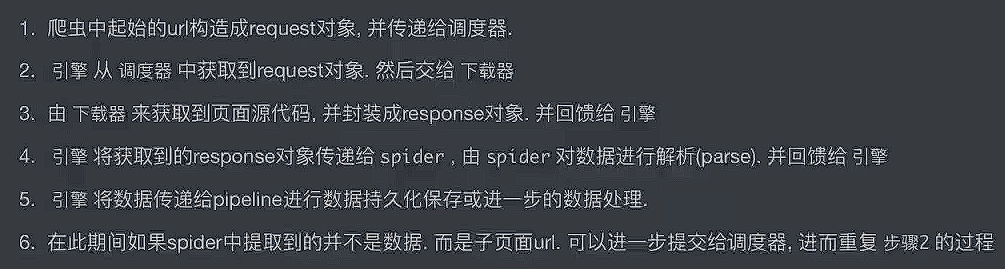
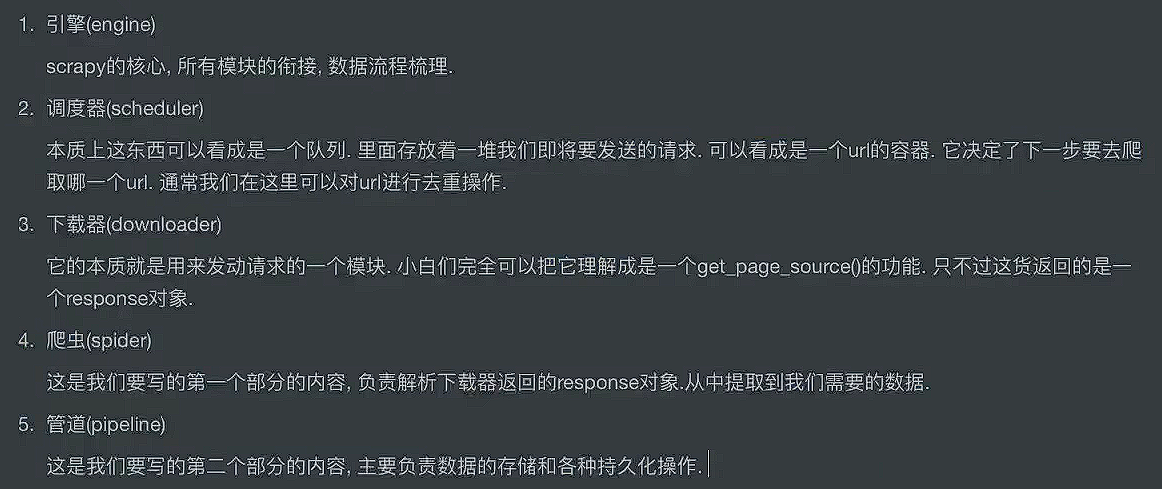
13.2. 基本使用
控制台执行scrapy startproject 项目名称
这里的示例项目名称使用 tianya,并设置为 Resource Root
进入到 tianya目录,控制台执行 scrapy genspider ty "tianya.org"

流程总结:


要使用到 redis,所以需安装依赖:redis、scrapy-redis
settings.py⬇️
BOT_NAME = "tianya"
SPIDER_MODULES = ["tianya.spiders"]
NEWSPIDER_MODULE = "tianya.spiders"
LOG_LEVEL = "WARNING"
ADDONS = {}
ROBOTSTXT_OBEY = False
CONCURRENT_REQUESTS_PER_DOMAIN = 1
DOWNLOAD_DELAY = 1
ITEM_PIPELINES = {
"tianya.pipelines.TianyaPipeline": 300,
}
FEED_EXPORT_ENCODING = "utf-8"
items.py⬇️
import scrapy
class TianyaItem(scrapy.Item):
title = scrapy.Field() # 标题
author = scrapy.Field() # 作者
reply = scrapy.Field() # 回复数
like = scrapy.Field() # 点赞数
mark = scrapy.Field() # 收藏数
ty.py⬇️
import scrapy
from redis import Redis
from tianya.items import TianyaItem
# 有可能产生重复的数据
# 1. 使用python的set集合去重
# 2. 使用redis的set集合去重(推荐)
# 用redis有两种方案去重:
# 1. url,优点:简单,缺点:如果url内部进行了更新,可能会忽略掉一些数据
# 2. 数据,优点:准确性高,缺点:若数据集庞大,对redis来说会产生BigKey
class TySpider(scrapy.Spider):
name = "ty"
allowed_domains = ["tianya.org"]
start_urls = ["https://www.tianya.org/"]
def __init__(self, name=None, **kwargs):
self.red = Redis(
host='127.0.0.1',
port=6379,
db=0,
decode_responses=False,
encoding="utf-8",
)
# 让父类能初始化
super(TySpider, self).__init__(name, **kwargs)
def parse(self, resp, **kwargs):
# 进入详情页
li_list = resp.xpath("//ul[@class='list-unstyled threadlist mb-0']/li")
for li in li_list:
href = li.xpath("./@data-href").extract_first()
detail_url = resp.urljoin(href)
result = self.red.sismember("tianya:ty:detail:url", detail_url)
if result:
print(f"该url已经被抓取过{detail_url}")
else:
yield scrapy.Request(
url=detail_url,
callback=self.parse_detail,
**kwargs
)
def parse_detail(self, resp):
t = TianyaItem()
title = resp.xpath("//div[@class='card card-thread']/div/div/div/h4/text()").extract_first()
author = resp.xpath("//span[@class='username']/a/text()").extract_first()
func_num_list = resp.xpath("//div[contains(@class, 'thread_left_func_num')]/text()").extract()
t['title'] = title.strip() if title else None
t['author'] = author.strip() if author else None
t['reply'] = func_num_list[0].strip() if len(func_num_list) >= 1 else None
t['like'] = func_num_list[1].strip() if len(func_num_list) >= 2 else None
t['mark'] = func_num_list[2].strip() if len(func_num_list) >= 3 else None
self.red.sadd("tianya:ty:detail:url", resp.url)
yield t
pipelines.py⬇️
class TianyaPipeline:
def process_item(self, item):
# 判断,是否在redis中存储了,若已存储就不进入数据库
print(item)
return item
**执行 scrapy crawl ty**⬇️
(.venv) PS G:PyCharm-2024-workplacePythonLearn第六章_Scrapy框架01_基础入门tianya> scrapy crawl ty
{'author': '木子居士',
'like': '0',
'mark': '0',
'reply': '3',
'title': '兄弟们,今年计划亏多少'}
{'author': '马克思',
'like': '0',
'mark': '0',
'reply': '3',
'title': '天涯社区网速测试如何?'}
{'author': None,
'like': '0',
'mark': '0',
'reply': '0',
'title': '出售维修二手租赁回收安捷伦 T1141A RFID HF测试仪'}
{'author': '马克思', 'like': '0', 'mark': '0', 'reply': '2', 'title': '新人求助'}
{'author': 'Snow',
'like': '23',
'mark': '14',
'reply': '378',
'title': '用我30年的经历,为你揭开周易的神秘-四书五经丶(6)'}
{'author': '点逐清风',
'like': '111',
'mark': '40',
'reply': '1387',
'title': '(长篇)女性秘史◆那些风华绝代、风情万种的女人,为你打开女人的所有秘密'}
{'author': '小笨笨',
'like': '28',
'mark': '15',
'reply': '447',
'title': '一个潜水多年的体制内的生意人来实际谈谈老百姓该怎么办?'}
{'author': '龙井茶',
'like': '26',
'mark': '17',
'reply': '475',
'title': '奶奶遗留一本怪书,里面都是一些吓人古术,给我带来了可怕的经历'}
{'author': '兰风筝',
'like': '7',
'mark': '0',
'reply': '283',
'title': '有这样的女友,你是什么感受'}
{'author': '马克思',
'like': '7',
'mark': '0',
'reply': '198',
'title': '这样的能结婚吗??'}
{'author': 'ighaonr',
'like': '1',
'mark': '0',
'reply': '99',
'title': '迷糊不迷糊你看了在说'}
{'author': '鑫伍',
'like': '16',
'mark': '7',
'reply': '238',
'title': '【经济专栏】赚未来十年的钱【已出版】'}
{'author': 'luyi',
'like': '0',
'mark': '0',
'reply': '37',
'title': '想她了可经打给她,建行卡号没变哦!!!'}
{'author': '马克思',
'like': '13',
'mark': '12',
'reply': '365',
'title': '【国庆礼包】天涯神帖1-211部大放送(2025/10/4修复)'}
{'author': '啦啦啦',
'like': '230',
'mark': '111',
'reply': '2822',
'title': '(全网最全最详细)天涯神贴合集1000篇 | 超全合集,无需解压'}
{'author': 'chenpingan',
'like': '2',
'mark': '0',
'reply': '187',
'title': '下班了,来波福利,'}
{'author': 'oylhoylh',
'like': '91',
'mark': '28',
'reply': '896',
'title': '【寒门再难出贵子】神帖限时开放'}
{'author': 'yugaochao',
'like': '0',
'mark': '0',
'reply': '59',
'title': '异域风情!!不一样的美!!'}
{'author': '247574',
'like': '4',
'mark': '0',
'reply': '235',
'title': '短裙过膝袜,绝对YYDS'}
{'author': None, 'like': '0', 'mark': '0', 'reply': '1', 'title': '为什么需要礼拜五'}
redis 数据库⬇️

13.3. 分布式

目录结构⬇️

items.py 和 pipelines.py 保持不变
ty.py 改动如下⬇️
import scrapy
from scrapy_redis.spiders import RedisSpider
from tianya2.items import TianyaItem
class TySpider(RedisSpider):
name = "ty"
allowed_domains = ["tianya.org"]
# start_urls = ["https://www.tianya.org/"]
redis_key = "ty_start_url"
def parse(self, resp, **kwargs):
# 自定义请求头
custom_headers = {
'Cookie': 'bbs_token=dnsSNob06Ok7KtBitQaxQjh5DGbAOfa4lAIqzSqHVljjwm9v; Hm_lvt_bdc65c3d1a40d80d03c75152017b11eb=1768646265; bbs_sid=7u2q69307h7c0na0lv64rur2cc'
}
# 进入详情页
li_list = resp.xpath("//ul[@class='list-unstyled threadlist mb-0']/li")
for li in li_list:
href = li.xpath("./@data-href").extract_first()
# 交给 Scrapy-Redis 做去重和调度
yield scrapy.Request(
url=resp.urljoin(href),
callback=self.parse_detail,
headers=custom_headers,
**kwargs
)
def parse_detail(self, resp):
t = TianyaItem()
title = resp.xpath("//div[@class='card card-thread']/div/div/div/h4/text()").extract_first()
author = resp.xpath("//span[@class='username']/a/text()").extract_first()
func_num_list = resp.xpath("//div[contains(@class, 'thread_left_func_num')]/text()").extract()
t['title'] = title.strip() if title else None
t['author'] = author.strip() if author else None
t['reply'] = func_num_list[0].strip() if len(func_num_list) >= 1 else None
t['like'] = func_num_list[1].strip() if len(func_num_list) >= 2 else None
t['mark'] = func_num_list[2].strip() if len(func_num_list) >= 3 else None
yield t
使用 redis 的布隆过滤器去重,所以需安装依赖:scrapy-redis-bloomfilter
settings.py⬇️
BOT_NAME = "tianya2"
SPIDER_MODULES = ["tianya2.spiders"]
NEWSPIDER_MODULE = "tianya2.spiders"
# debug < info < warning < error < critical
LOG_LEVEL = "INFO"
ADDONS = {}
ROBOTSTXT_OBEY = False
CONCURRENT_REQUESTS_PER_DOMAIN = 1
DOWNLOAD_DELAY = 1
# 配置全局请求头
DEFAULT_REQUEST_HEADERS = {
'UserAgent': 'Mozilla/5.0 (Windows NT 10.0; Win64; x64) AppleWebKit/537.36 (KHTML, like Gecko) Chrome/138.0.0.0 Safari/537.36 Edg/138.0.0.0'
}
# ========== redis 相关配置 ==========
REDIS_PARAMS = {
'host': '127.0.0.1',
'port': 6379,
'db': 0,
}
# ========== scrapy_redis 相关配置 ==========
# 分布式调度器
SCHEDULER = "scrapy_redis.scheduler.Scheduler"
# 分布式去重 (这里使用布隆过滤器)
DUPEFILTER_CLASS = "scrapy_redis_bloomfilter.dupefilter.RFPDupeFilter"
# 哈希函数个数,默认为 6
BLOOMFILTER_HASH_NUMBER = 6
# BloomFilter 的 bit 参数,默认为 30,占用 128MB 空间,去重量级为 1 亿
BLOOMFILTER_BIT = 30
# 断点续爬 (可选)
SCHEDULER_PERSIST = True
ITEM_PIPELINES = {
"tianya2.pipelines.TianyaPipeline": 300,
"scrapy_redis.pipelines.RedisPipeline": 301,
}
FEED_EXPORT_ENCODING = "utf-8"
在控制台 tianya2 文件夹目录下执行命令 scrapy crawl ty
进入 redis-cli 执行 lpush ty_start_url https://www.tianya.org/命令
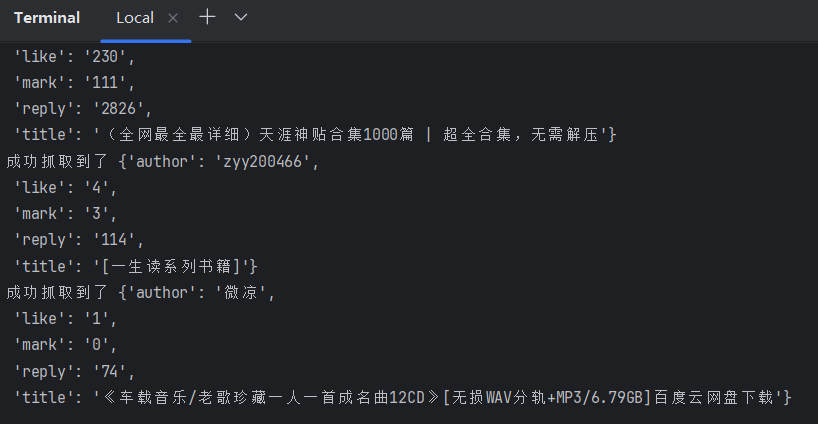
控制台输出如下⬇️
redis 数据库⬇️

使用 MySQL 存储数据⬇️
创建 spider_test 数据库:

创建 new 数据表:
-- 天涯论坛爬虫数据存储表:存储抓取的帖子基础信息
CREATE TABLE `news` (
`id` bigint(11) NOT NULL AUTO_INCREMENT COMMENT '主键ID,自增唯一标识',
`title` varchar(255) NOT NULL COMMENT '帖子标题',
`author` varchar(255) NOT NULL COMMENT '帖子发布作者',
`reply` int(11) NOT NULL COMMENT '帖子回复数',
`like` int(11) NOT NULL COMMENT '帖子点赞数(`like`为MySQL关键字,需反引号包裹)',
`mark` int(11) NOT NULL COMMENT '帖子收藏数',
`url` varchar(255) NOT NULL COMMENT '帖子唯一链接(作为唯一键,避免重复抓取)',
PRIMARY KEY (`id`) COMMENT '主键约束:基于自增ID',
UNIQUE KEY `uk_url` (`url`) COMMENT '唯一键约束:保证帖子URL不重复,避免重复插入数据'
) ENGINE=InnoDB DEFAULT CHARSET=utf8mb4 COMMENT='天涯论坛帖子爬虫数据表';
安装依赖:pymysql
settings.py 添加配置:
ITEM_PIPELINES = {
"tianya2.pipelines.TianyaPipeline": 300,
# "scrapy_redis.pipelines.RedisPipeline": 301,
"tianya2.pipelines.MysqlPipeline": 302,
}
MYSQL_CONFIG = {
'host': '127.0.0.1',
'port': 3306,
'user': 'root',
'password': '你的MySQL密码',
'db': 'spider_test',
'charset': 'utf8mb4'
}
pipelines.py 代码:
import pymysql
from twisted.enterprise import adbapi
class TianyaPipeline:
def process_item(self, item, spider):
spider.logger.info(f"成功抓取到了 {item}")
return item
class MysqlPipeline:
def __init__(self, db_pool):
self.db_pool = db_pool
@classmethod
def from_crawler(cls, crawler):
db_params = crawler.settings.get('MYSQL_CONFIG')
db_pool = adbapi.ConnectionPool(
'pymysql',
**db_params,
autocommit=True,
cursorclass=pymysql.cursors.DictCursor
)
return cls(db_pool)
def process_item(self, item, spider):
# 异步插入数据
query = self.db_pool.runInteraction(self.insert_item, item)
query.addErrback(self.handle_error, item, spider)
return item
def insert_item(self, cursor, item):
insert_sql = """
INSERT INTO news(title, author, reply, `like`, mark, url)
VALUES (%s, %s, %s, %s, %s, %s)
"""
cursor.execute(insert_sql, (
item.get('title') or ' ',
item.get('author') or ' ',
item.get('reply', 0),
item.get('like', 0),
item.get('mark', 0),
item.get('url') or ' ',
))
def handle_error(self, failure, item, spider):
spider.logger.error(f"MySQL插入失败:{failure},Item:{item}")
def close_spider(self, spider):
self.db_pool.close()
按照之前的步骤启动爬虫程序,可观察到数据已成功入库:

本文地址:https://www.yitenyun.com/2915.html
最新文章
热门文章